These applications are usually slow to be replaced with a more modern version because they are critical to an organization’s business operations. Reasons organizations undertake modernizations instead of buying or building a completely new application include:
- There is no application on the market that fits all of an organization’s needs.
- The application is a key part of an organization’s product portfolio.
- There are security regulations that are best adhered to with the current application.
However, there are legitimate reasons to simply replace the legacy application. For example, an organization might deem rebuilding an application more resource-intensive than practical. In which case, building or buying a new application makes better use of available resources. Or, the gap between the state of the legacy application and where it needs to be could be large enough that the underlying technology cannot be turned into a modern application.
Modernizing a legacy application often involves reworking the code to varying degrees. Sometimes it is just to make the legacy application work with APIs. The other extreme is coding a new version of the legacy application from scratch.
An effective method for modernizing legacy applications is to rebuild them to have a cloud-native architecture. While this results in an application that is ready to take advantage of modern cloud environments, it requires heavy investments in time, money, and skill.
The Cost of Maintaining Legacy Applications
Maintaining legacy applications can take up a lot of time, labor, and money. And since these applications are harder to update, security issues can arise as new threats quickly evolve.
Legacy applications consume a significant portion of a budget and labor. However, to go through legacy application modernization is to invest a comparably significant amount of budget into hiring skilled personnel and the labor and resources they need to modify or rebuild a legacy application. An IT department may not have the resources to keep legacy applications running as well as invest in legacy application modernization. This forces the department to make difficult decisions for what to fund and to what extent.
Legacy and Modern Applications
Legacy applications typically are monolithic, meaning they are single-tier software applications where all the pieces of the applications are built into one platform. In a monolithic application, there’s no clear separation between the different elements of the applications. The result is in order to update one piece of the application; a new version of the entire application needs to be rolled out. Similarly, a bug in one element can affect the overall functionality and be difficult to pinpoint and fix. Overall, the monolithic nature demands upkeep, and maintenance on legacy applications can be incredibly cumbersome and slow.
In contrast, modern applications usually are broken down into loosely coupled, individual services called Microservices. The Microservices are stored in containers, which are runtime environments that have only the elements of an operating system (OS) needed to run a Microservice.
Modernizing Legacy Applications
Microservices are housed in containers. Containers are small software packages that only have the necessary parts of an OS to run a specific Microservice and nothing more. Because they are smaller, they can be scaled more easily because copying those takes less time. Containers are what allow a Microservice to be replaced and rolled back. With a management platform like Kubernetes, containers can be isolated and individually updated across multiple servers in rolling updates.
Cloud-native applications use this architecture. They are called cloud native because they are designed specifically to run in a cloud. Cloud-native applications are made of loosely-coupled Microservices. That means individual or groups of Microservices can be isolated and worked on by developers individually. The overall application is therefore not disrupted and unrelated Microservices are not significantly affected.
Things to Consider When Updating a Legacy Application
An organization shouldn’t start adapting an old application into a modern one without a well-thought-out plan on how to do so and what budget to assign to it. Formulating the plan isn’t a simple task, however. IT department budgets aren’t always deep wells that permit the department to comfortably fund both the maintenance of legacy applications at the same time as the development of a modern application.
An organization should determine what its goals are for going through legacy application modernization. One goal could be to move to the cloud and leverage all of the cloud’s functions requiring a full modernization. Another goal could be to simply move the application to the cloud as quickly as possible. By lifting-and-shifting, as this is called, money can be saved on data center operation and maintenance, to minimize disruption of services, and have some form of relatively greater scalability. Lifting-and-shifting requires minimal changes to the application, if any.
With those goals in mind, an organization should then define the issues it needs to address with its legacy application. Some parts of the legacy application could be more essential than others. Some parts of the legacy application are degrading the customer experience and will need improvement alongside modernization.
Organizations don’t want to go through all of this trouble just to have the same issue in the future. That’s why they should research modern technologies and approaches that can be easily updated.
Using virtualized infrastructure along with open source code can be one way to do this. Virtualized infrastructures, such as Microservices, are separated from the hardware they reside on and can be updated more easily than hardware-based infrastructures.
An organization’s developers and dedicated open source developers together are continuously working open source code. This ensures the code being used in the application is being maintained and fixed on a constant basis from a diverse group of people with different perspectives. To keep the modern application’s code up to date, simply download new versions from an open source library, integrate it with the application, and publish an update.
Any changes done to the application should be documented in detail. Having detailed documentation means when issues in the modern application’s code arise later, they can more easily be addressed because the DevOps teams can investigate the documentation and find the exact source of the problem. Poor documentation may be one reason reworking a legacy application can be so difficult, especially when the developers who made the legacy application no longer work for the organization.
It is particularly important for organizations to ensure they have the skill base in their IT departments to perform legacy application modernization. Again, this is especially the case when the original developers aren’t around. Options available to organizations include upskilling existing employees, hiring new employees, or partnering with a cloud migration organization.
Upskilling existing employees may be the most cost-effective approach but requires the employees to go through training processes, which take time. It is up to the organization to research the amount of time this takes and if the organization would rather hire new employees or work with a third party.
Legacy Application Modernization and the Cloud
Running applications in the cloud has increasingly become the norm. Legacy applications do not run well in the cloud without being changed. One example of an approach for legacy application modernization that does not prepare the application for the cloud is lifting and shifting. This is where minor changes or APIs are applied to the application before it is sent to a cloud environment.
There are benefits that come with moving legacy applications to the cloud from on-premises data centers. Primarily, the cloud is less difficult for organizations to work with and maintain, because of services from the cloud provider. Operating costs are also much lower because an organization can only pay for the resources it uses and doesn’t have to conduct maintenance on the physical infrastructure.
Customer experience also improves when an organization fully modernizes its legacy application and makes it cloud-native. This is because any issues with the application that would otherwise disrupt service can be fixed faster and with more granularities.
Another reason to move from legacy to cloud-native applications is to keep up with changing infrastructures and new technologies. An organization’s IT team can make APIs that allow the application to communicate with a new infrastructure. There is a mitigated risk of changes to the application itself containing bugs; however, there is a risk the APIs will be faulty.
This is a particular risk if the personnel working with the legacy application were not the original developers and don’t have quality documentation to understand the complexities of the legacy application. Additionally, by simply placing the legacy application in the cloud, the application cannot utilize all of the cloud’s features. This results in organizations spending more on the cloud than they otherwise would.
There are different degrees in which to work with legacy applications to transform them into something that can run in a cloud. The names for these different approaches are refactoring, revise, rebuilding, retirement, and replacement. Rebuilding a legacy application is the approach that most fits true legacy application modernization. It is when an application is rewritten or re-architected from the ground up, sometimes by using a cloud provider’s platform-as-a-service coding tools.
]]>UDM manages network user data in a single, centralized element.
UDM is similar to the 4G network’s Home Subscriber Server (HSS) but is cloud-native and designed for 5G specifically.
It can be paired with the User Data Repository (UDR) which stores the user data such as customer profile information, customer authentication information, and encryption keys for the information. UDM resides on the control plane and utilizes microservices to communicate between the user plane and the control plane.
The storage space of all the UDM’s information could reside in a hyperconverged infrastructure (HCI). 5G and HCI work together because 5G needs the virtualization HCI applies to the compute, networking, and storage resources so the network can be entirely virtualized.
Stateful and Stateless Versions of UDM
A stateful UDM keeps data on hand locally, while a stateless version stores data externally in the UDR. A stateful architecture shares data among microservices that orchestrate communication between the network planes. Some organizations prefer to have stateful microservices because of the record they keep. The downside is that if a problem arises, then all microservices sharing information must be taken off the network at once.
A stateless architecture keeps subscriber data separate from the functions it supports. This way, database access is kept separate from the operation of the network, improving stability and flexibility. The downside is that multiple nodes can’t update the same points of information at once, which can cause lag in the network.
UDM Function
The UDM manages data for access authorization, user registration, and data network profiles. Subscriber data is provided to the Session Management Function (SMF), which allocates IP addresses and manages user sessions on the network.
Depending on the construction of the 5G architecture, both UDM software and the UDR can send and store data. In a stateless network, user information is stored in the UDR, but the UDM function retrieves the data, sends it to other network functions, and generally manages it. The UDM can do this with many UDRs.
The Access and Mobility Function (AMF) receives user information sent through the network. It then forwards the information to the SMF, which uses it to determine what session manager would be best assigned to the user. Consider the SMF as a gateway from the user plane to the control plane of the network.
UDM and HSS
The HSS of 4G networks fills a similar function to the UDR. It stores customer profile data and authentication information along with encryption keys. In a 5G network, the function of the HSS is split into the Authentication Server Function (AUSF), the UDM, and the UDR (when it is a stateless architecture). The AUSF authenticates servers and provides encryption keys. The UDM stores and manages the data. The move from the HSS to a UDM and UDR is one of the many changes coming in the 4G to 5G transition.
]]>What is RAN Edge?
The Radio Access Network (RAN) edge is outside the network core and closer to the end-user. 5G RAN incorporates virtualization and edge computing into its infrastructure.
RAN nodes at the edge connect users to the core network, clouds, the internet, and to other users without user data traveling as far before reaching the nearest RAN node. Adding general-purpose servers to a RAN node gives the node more compute, networking, and storage resources to use.
Types of RAN nodes can be traditional cell towers, rooftop antennas, or small cell deployments more common with 5G RANs. An alternative to installing servers at a node is using a local data center to serve multiple nodes. Servicing multiple nodes in this way is commonly associated with cloud RAN (C-RAN), but is not the only defining characteristic of C-RAN architecture; nor is it only used in C-RAN.
RAN deployments at the edge have benefits including lower latencies, improved user experiences, optimized network efficiency, reduced network congestion, and local compute power for devices. These benefits open up or improve use cases including autonomous vehicles CV2X (Cellular Vehicle to Anything), mobile gaming, and support for the Internet of Things (IoT).
Virtualizing RAN Infrastructure at the Edge
Many RAN deployments are in the process of being virtualized through software-defined networking (SDN) and network functions virtualization (NFV). The edge becomes more accessible and reasonable when using a virtual RAN (vRAN) architecture. This is because the network operators can split the RAN functions between different aspects of the RAN. For example, vRAN is commonly split between the central unit (CU) and distributed unit (DU).
While the CU may be on-site at the edge with a DU, it can also be more centrally located at an aggregation site and interact with multiple DUs. A CU operates protocols including the Radio Resource Control (RRC) and Packet Data Convergence Protocol (PDCP).
The RRC ensures the quality of service, connects user equipment to the RAN, and broadcasts information. The PDCP compresses and decompresses IP data stream headers, transfers user data over the RAN, among other technical functions. These are examples of the control and user plane functions.
The DU controls protocols are designed for the lower network levels of the OSI model. The protocols include the radio link control (RLC), medium access control (MAC), and the PHY protocol. The last of the list is called PHY because it interacts with the physical layer of the network, typically the node’s radio unit.
A radio unit consists of the antenna and some software. The antennas of course transmit and receive the radio frequencies over the air. The associated software converts the data received as frequencies into a format the rest of the RAN functions can read.
In 5G RANs, antennas are being upgraded to multiple-input, multiple-output (MIMO) antennas, more specifically referred to as massive MIMO in 5G networks. Massive MIMO is multiple antennas in one unit with a physical size corresponding to the frequency it supports. Additionally, MIMO technology has much more transmission ports that increase the network capacity and data throughput. The catch here is it requires more processing resources to support all antenna signals. Having edge computing resources can help support massive MIMO.
Use Cases That Benefit From the RAN Edge
A number of use cases are possible with computing power closer to the user. Using edge computing in a RAN reduces latency, alleviates network congestion, aids autonomous vehicles, improves mobile gaming experiences, and supports dense Internet of Things (IoT) deployments, among other use cases.
Lower Latency and Reducing Network Congestion
Moving resources to the RAN edge reduces latency because instead of processing and analyzing data in the cloud, it can be done closer to the user. In short, data spends less time going through the network and returns to the user faster.
This helps to ease network congestion because everyone’s data is not going over the same paths to the network core or cloud, but instead is localized. Basically, not everyone is on one highway going to the same distant location. Instead, they are only on the highway for a short time before exiting and arriving at their destination. This leaves room for other drivers that are entering the highway further down.
Increasing computing power throughout the RAN gives individual nodes the power to intelligently route data over the network. Instead of relying on inefficient routing tables, the local computing power supports routing software that is aware of network health. Since the software is aware of how the different connections are performing, it can send traffic over an optimal route.
Self-Driving Cars
Autonomous vehicles and self-driving cars are a popular use case discussed with edge computing and 5G (CV2X Cellular Vehicle to anything). An important element to note is most of the functions an autonomous vehicle relies on to function safely and effectively can and are done within the vehicle. Relying on edge computing to analyze and process data used for when to break is dangerous. Instead, secondary functions can be offloaded. The “5G Edge Computing Whitepaper” published by the FCC’s 5G IoT Working Group, suggested offloading the storing and updating of detailed maps to the edge.
Mobile Gaming at the RAN Edge
Another popular set of use cases for edge computing are augmented reality (AR) and virtual reality (VR). Both of these require low latency and consume a large number of computing resources. However, they are a subset of a larger use case that will require edge computing for the same reasons; mobile gaming, as the graphics quality and technical complexity of mobile games are increasing.
Phones running advanced games on themselves suffer from short battery life. So, putting the compute resources separated from where the gameplay occurs makes sense. However, if the data processing is in a central cloud, the latency would make any game unplayable. This makes edge computing important to mobile gaming for the reasons stated above for low latency and reducing network congestion.
Dense IoT Deployments
Dense IoT deployments put a lot of strain on a network because of their combined demand for computing resources and a high degree of data creation. IoT devices are often small and are not designed with a lot of computing power within them. Edge computing is able to take over processing and analyzing a large amount of data an IoT device’s sensors created throughout a day. Edge computing on the RAN specifically is beneficial here because the IoT device is sending its data over the network to wherever the computing resources are. Therefore, having those resources at the nearest network node allows for the data to go over the infrastructure it would use anyways and get to the resources quickly, reducing network congestion.
]]>Hello Folks, welcome back to Learnizo Global. SDN controller is the application that acts as a strategic control point in a software-defined network. Essentially, it is the “brain” of the network.
Software-defined networking (SDN) is the separation of a network’s control functions from its forwarding functions. When SDN is used in conjunction with network functions virtualization (NFV), the two create virtual network overlays that exist on top of the physical network infrastructure. SDN architecture relies on controllers to allow network administrators to manage the network.
SDN controller manages flow control to the switches/routers “below” (via southbound APIs(Application Programming Interfaces)) and the applications and business logic “above” (via northbound APIs) to deploy intelligent networks. They consolidate and mediate between different controller domains using common application interfaces.
Two of the most well-known protocols used by SDN controllers to communicate with the switches/routers are OpenFlow and open virtual switch database (OVSDB). Other controller protocols are being currently developed, many of them open-standard and collaborative. For example, the Internet Engineering Task Force (IETF) working group — the Interface to the Routing System (i2rs) — developed an SDN standard that enables a controller to leverage proven, traditional protocols, such as OSPF, MPLS, BGP, and IS-IS, across a variety of SDN platforms.
The type of protocols supported can influence the overall architecture of the network — for example, while OpenFlow attempts to completely centralize packet-forwarding decisions, i2rs splits the decision-making by leveraging traditional routing protocols to execute distributed routing and allowing applications to modify routing decisions.
SDN Controller Platforms
An SDN controller platform typically contains a collection of “pluggable” modules that can perform different network tasks. Some of the basic tasks including inventorying what devices are within the network and the capabilities of each, gathering network statistics, and other monitoring functions, etc. Extensions can be inserted that enhance the functionality and support more advanced capabilities, such as running algorithms to perform analytics and orchestrating new rules throughout the network.
A controller platform can be from a different company than the application is from, allowing for interoperability and flexibility. Cisco, for example, offers a controller platform built by OpenDaylight. This open-source controller is interoperable with several different proprietary applications.

A Little History
The first SDN controller was NOX, which was initially developed by Nicira Networks, alongside OpenFlow. In 2008, Nicira Networks (acquired by VMware) donated NOX to the SDN community, making it open source. It has since become the basis for many SDN controller solutions. Nicira then went on to co-develop ONIX with NTT and Google; ONIX is the base for the Nicira/VMware controller. While ONIX was originally supposed to be opened up, the parties later decided not to make it open source.
There are, however, a variety of open-source controllers currently available. The earliest ones include POX and Beacon. Started in early 2010, Beacon is a Java-based OpenFlow controller licensed under a combination of the GPL v2 license and the Stanford University FOSS License Exception v1.0. Other controllers of note include Trema (Ruby-based from NEC), as well as Ryu (supported by NTT).
Subsequently, vendors such as Cisco, HP, IBM, VMWare, Lumina Networks, and Juniper have jumped into the controller market with their own offerings.
OpenDaylight is another major player in the SDN controller game, as it’s the largest open-source SDN controller and SDN controller platform currently offered on the market.
SD-WAN Controllers
Software-defined wide area network (SD-WAN) has seen increased popularity among enterprises. One of the reasons for its popularity is that the centralized application-based policy controller leverages existing hybrid WAN architectures. The controller in conjunction with analytics brings network and application visibility.
]]>Hello Folks, welcome back to Learnizo Global. Whether we know it or not, every one of us interacts with CDNs on a daily basis; when reading this article, shopping online, watching YouTube videos, or perusing social media feeds. No matter what you do, or what type of content you consume, chances are that you’ll find CDNs behind every character of text, every image pixel, and every movie frame that gets delivered to your PC and mobile browser. Content delivery networks (CDN) are the transparent backbone of the Internet in charge of content delivery. This article will focus on providing insight on the whys, whats, and hows of a CDN.
What is a CDN?
A content delivery network (CDN) refers to a geographically distributed group of servers that work together to provide fast delivery of Internet content.

A CDN allows for the quick transfer of assets needed for loading Internet content including HTML pages, JavaScript files, stylesheets, images, and videos. The popularity of CDN services continues to grow, and today the majority of web traffic is served through CDNs, including traffic from major sites like Facebook, Netflix, and Amazon.
A properly configured CDN may also help protect websites against some common malicious attacks, such as Distributed Denial of Service (DDoS) attacks.
While the delivery of website content is a common use for CDNs, it’s not their only function. In fact, CDNs deliver a wide variety of content that includes: 4K and HD-quality video, audio streams, software downloads such as apps, games, and OS updates, and much more. Potentially any data that can be digitized can be delivered through a content delivery network.
CDN and Web Host
While a CDN does not host content and can’t replace the need for proper web hosting, it does help cache content at the network edge, which improves website performance. Many websites struggle to have their performance needs meeting by traditional hosting services, which is why they opt for CDNs.
By utilizing caching to reduce hosting bandwidth, helping to prevent interruptions in service, and improving security, CDNs are a popular choice to relieve some of the major pain points that come with traditional web hosting.
What are the benefits of using a CDN?
Although the benefits of using a CDN vary depending on the size and needs of an Internet property, the primary benefits for most users can be broken down into 4 different components:
Improving website load times – By distributing content closer to website visitors by using a nearby CDN server (among other optimizations), visitors experience faster page loading times. As visitors are more inclined to click away from a slow-loading site, a CDN can reduce bounce rates and increase the amount of time that people spend on the site. In other words, a faster website means more visitors will stay and stick around longer.
Reducing bandwidth costs – Bandwidth consumption costs for website hosting is a primary expense for websites. Through caching and other optimizations, CDNs are able to reduce the amount of data an origin server must provide, thus reducing hosting costs for website owners.
Increasing content availability and redundancy – Large amounts of traffic or hardware failures can interrupt normal website function. Thanks to its distributed nature, a CDN can handle more traffic and withstand hardware failure better than many origin servers.
Improving website security – A CDN may improve security by providing DDOS mitigation, improvements to security certificates, and other optimizations.
How does a CDN work?
To minimize the distance between the visitors and your website’s server, a CDN stores a cached version of its content in multiple geographical locations (a.k.a., Points of Presence, or PoP). Each PoP contains a number of caching servers responsible for content delivery to visitors within its proximity.
In essence, CDN puts your content in many places at once, providing superior coverage to your users. For example, when someone in Bangalore accesses your US-hosted website, it is done through a local India PoP.
CDNs can reduce the amount of data that’s transferred by reducing file sizes using tactics such as minification and file compression. Smaller file sizes mean quicker load times.
CDNs can also speed up sites that use TLS/SSL (Transport Layer Security/ Secure Socket Layer) certificates by optimizing connection reuse and enabling TLS false start.
Reliability and Redundancy – How does a CDN keep a website always online?
Uptime is a critical component for anyone with an Internet property. Hardware failures and spikes in traffic, as a result of either malicious attacks or just a boost in popularity, have the potential to bring down a web server and prevent users from accessing a site or service. A well-rounded CDN has several features that will minimize downtime:
Load balancing distributes network traffic evenly across several servers, making it easier to scale rapid boosts in traffic.
Intelligent failover provides uninterrupted service even if one or more of the CDN servers go offline due to hardware malfunction; the failover can redistribute the traffic to the other operational servers.
In the event that an entire data center is having technical issues, Anycast routing transfers the traffic to another available data center, ensuring that no users lose access to the website.
Data Security – How does a CDN protect data?
Information security is an integral part of a CDN. a CDN can keep a site secured with fresh TLS/SSL certificates which will ensure a high standard of authentication, encryption, and integrity. Investigate the security concerns surrounding CDNs, and explore what can be done to securely deliver content.
]]>Hello Folks, welcome back to Learnizo Global. In this article, you will gain insight into a relatively new and emerging technology space that is IBN (Intent-Based Networking). Cisco and Apstra are the leading vendors of IBN at present. IBN aims to apply a deeper level of intelligence and intended state insights to networking. Ideally, these insights replace the manual processes of configuring networks and reacting to network issues. We shall also understand the relationship of IBN with SDN, Dev-Ops, Machine Learning (ML), and advanced automation. Later in the article, we will discuss the architecture considerations and the benefits of IBN.
What is Intent-Based Networking?
“Intent” is the keyword in this technology. It describes a network’s business objective. IT professionals establish policies that specify the network’s business intent, auto-prescribe how to satisfy that goal, and automate at scale.
Traditional networking relied on a command-line interface (CLI) to manually set up policies for all vendors’ networking devices individually. The vendors have a unique interface and syntax for their products, resulting in IT professionals learning the CLI syntax for each vendor’s device to achieve the network’s business objective. IBN approach is vastly different from CLI. IBN operates as a Network-as-a-Service (NaaS), meaning it is end-to-end networking that seamlessly manages all devices on one interface.

IBN is defined as a self-driving network that automatically applies business intent to various network devices across a network without having to rely on a command-line interface (CLI). Instead, the network administrator writes intent in plain language or via a graphical interface. In simple terms, IBN is about telling the software what the business intent is with the software automatically applying the intent across the network.
Intent-based networking is a three-step cycle of translating intent, automating network configuration, and monitoring the intent across the network. IBN isn’t a sole technology by itself, it involves orchestration policies to automate configuration to an already existing software-defined networking (SDN) technology in a network infrastructure.
Sasha Ratkovic, Apstra’s CTO and co-founder, has written that to qualify as IBN a technology must meet several requirements:
First, it must be based on a single source of truth with the state represented in a graph that captures all the relationships between all the various layers.
The first requirement is a prerequisite for the second – It must include real-time, continuous validation of all aspects of customer intent – across network connectivity, performance, and security.
The second is a prerequisite for the third – It must have the ability to self-heal.
How IBN relates to AI, ML, SDN, and Dev-Ops
Artificial intelligence (AI) and machine learning (ML) are involved in the translating, configuring, and monitoring process. The technologies enable IBN “to analyze data, extract information from data and learn from it automatically, without being explicitly programmed.”
IBN is achievable through orchestration and machine learning (ML). Together, the two technologies create a closed cycle that constantly refreshes and applies the intent.

IBN is not designed to work on its own. It is an addition to software-defined networking (SDN) that brings automation to network configuration. SDN is important to IBN because virtualization is required for IBN to provide its benefits and have one interface control an entire network. The network that follows IBN consist of software-based devices that have been virtualized based on the design of SDN architecture.
While Intent-based networking is compared with software-defined networking (SDN), it also contrasts in a few distinctive ways. Mainly, intent-based networking adds Dev-Ops, and it allows network operators more control over running the network.
IBN and Advanced automation
Advanced automation and IBN, both technologies resemble each other however there are remarkable differences between them. Advanced automation solutions typically do not
a) -translate what to how
b) -mathematically validate that desired intent is being met and
c) -continuously ingest a broad set of real-time network state indicators. A good intent-based networking system will embed advanced automation, but you can (and many do) advanced automation without Intent.”
Considerations for IBN Architecture
The Open Network User Group (ONUG) describes IBN as a different perspective of what a network is and how it can operate. It’s “moving beyond viewing the network as routing, switching, wireless to Campus, WAN, Data Center, and Cloud; instead, it’s a broader strategy to revamp the entire network portfolio.”
Below are the key considerations when implementing IBN architecture:
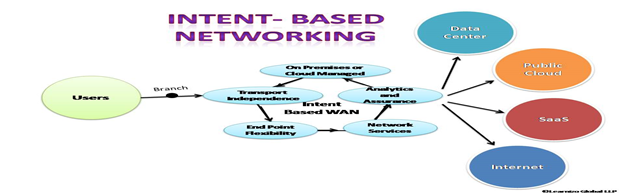
- Analyze each networking project and define if intent-based networking can be added to those projects before implementing IBN into the network architecture.
- SDN is important to IBN because there is no need to invest in new technology as IBN can be added to already existing SDN technology. Attach orchestration policy-based automation, either to single domains or multiple domains, to successfully implement IBN into the networking architecture.
- Ensure robust and thorough monitoring and assurance are in place.
- Understand that artificial intelligence (AI) and machine learning (ML) are involved in the translating, configuring, and monitoring process. The technologies enable IBN “to analyze data, extract information from data and learn from it automatically, without being explicitly programmed.”
- The Enterprise Strategy Group advises that “to really maximize the benefit of intent-based networking, IT needs to implement comprehensive, end-to-end architectures across all domains, such as DC, campus, branch extended enterprise, cloud, etc.”
- The network architecture should have security already in place, but it needs to also encompass the IBN components. Verify that the security protocol in place will safeguard the IBN component.
- Review the application programming interfaces (APIs) in the network architecture to determine if they will work with IBN.
The Benefits of Intent-Based Networking
- Increased agility and availability
- Vendor-neutral — IBN will work across all devices from different providers
- Improved control and performance. As administrators input the defined intent, the software decides the best way to implement that intent across the network.
- Self-Service — It allows for real-time updates and monitoring.
- Security detection — Detects security issues in real-time.
A prerequisite for further reading is that you should have a fair idea about containers and microservices described in our previous articles. Containerization has brought a lot of flexibility for developers in terms of managing the deployment of the applications. However, the more granular the application is, the more components it consists of and hence requires some sort of management for those.
Kubernetes:
- Manages scheduling the deployment of a certain number of containers to a specific node.
- Manages networking between the containers.
- Take care of the resource allocation.
- Moves containers around as they grow and much more.
Kubernetes is the combined solution for what the majority of current applications need such as replication of components, auto-scaling, load balancing, rolling updates, logging across components, monitoring and health checking, service discovery, authentication.
Kubernetes Abstraction
Before we dive into Kubernetes components, we will look into below essential terms below to understand how Kubernetes functions. Kubernetes deploys abstraction at the pod and service levels.
Pod
Kubernetes targets the management of elastic applications that consist of multiple microservices communicating with each other. Often those microservices are tightly coupled forming a group of containers that would typically, in a non-containerized setup run together on one server. This group, the smallest unit that can be scheduled to be deployed through K8s is called a pod.
This group of containers would share storage, Linux namespaces, cgroups, and IP addresses. These are co-located, hence share resources, and are always scheduled together.
Pods are not intended to live long. They are created, destroyed, and re-created on-demand, based on the state of the server and the service itself.
Service
As pods have a short lifetime, there is no guarantee about the IP address they are served on. This could make the communication of microservices hard.
Imagine a typical Frontend communication with Backend services. Hence K8s has introduced the concept of a service, which is an abstraction on top of a number of pods, typically required to run a proxy on top, for other services to communicate with it via a virtual IP address.
This is where you can configure load balancing for your numerous pods and expose them via a service.
Kubernetes components
A K8s setup consists of several parts, some of them optional, some mandatory for the whole system to function.
This is a high-level diagram of the architecture
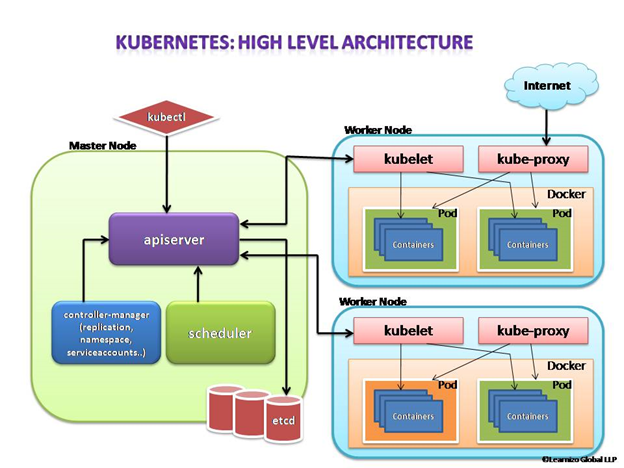
Let us have a look into each of the component’s responsibilities.
Master Node
The master node is responsible for the management of the Kubernetes cluster. This is the entry point of all administrative tasks. The master node is the one taking care of orchestrating the worker nodes, where the actual services are running.
Let’s dive into each of the components of the master node.
apiserver
The API server is the entry point for all the REST (Representational State Transfer) commands used to control the cluster. It processes the REST requests, validates them, and executes the bound business logic. The resulting state has to be persisted somewhere, and that brings us to the next component of the master node.
etcd storage
etcd is a simple, distributed, consistent key-value store. It is mainly used for shared configuration and service discovery.
It provides a REST API (Application Programming Interface) for CRUD (create, read, update and delete) operations as well as an interface to register watchers on specific nodes, which enables a reliable way to notify the rest of the cluster about configuration changes.
An example of data stored by Kubernetes in etcd is jobs being scheduled, created and deployed, pod/service details and state, namespaces and replication information, etc.
scheduler
The deployment of configured pods and services onto the nodes happens thanks to the scheduler component.
The scheduler has the information regarding resources available on the members of the cluster, as well as the ones required for the configured service to run and hence is able to decide where to deploy a specific service.
controller-manager
Optionally you can run different kinds of controllers inside the master node. controller-manager is a daemon embedding those.
A controller uses apiserver to watch the shared state of the cluster and makes corrective changes to the current state to change it to the desired one.
An example of such a controller is the Replication controller, which takes care of the number of pods in the system. The replication factor is configured by the user, and it’s the controller’s responsibility to recreate a failed pod or remove an extra-scheduled one.
Other examples of controllers are endpoints controller, namespace controller, and service accounts controller, but we will not dive into details here.
Worker node
The pods are run here, so the worker node contains all the necessary services to manage the networking between the containers, communicate with the master node, and assign resources to the containers scheduled.
Docker
Docker runs on each of the worker nodes, and runs the configured pods. It takes care of downloading the images and starting the containers.
kubelet
kubelet gets the configuration of a pod from the apiserver and ensures that the described containers are up and running. This is the worker service that’s responsible for communicating with the master node. It also communicates with etcd, to get information about services and write the details about newly created ones.
kube-proxy
kube-proxy acts as a network proxy and a load balancer for a service on a single worker node. It takes care of the network routing for TCP (Transmission Control Protocol) and UDP (User Datagram Protocol) packets.
kubectl
And finally, a command-line tool to communicate with the API service and send commands to the master node.
In our next article, we will have an insight into the Kubernetes monitoring process. Till then stay safe and happy learning with Learnizo Global.
]]>Cloud Computing and Cloud Service models
Let’s quickly understand Cloud computing and Cloud service models. Cloud computing consists of applications and services moved from local computing deployments to somewhere into the Internet “Cloud”.
Cloud deployments offer a virtualized environment where resources are scalable on-demand. Outsourced services are accessed through the Internet using common protocols and networking standards.
Cloud computing (e.g. Amazon, Rackspace, Google) companies build large data centers to sell low-cost and scalable storage and computing. Service Providers and other companies move their applications and services to the cloud. Cloud computing offers two major advantages for Cloud providers and end-users (service providers).
a) More efficient usage of resources: Virtualization enables sharing of physical services, storage, and networking capabilities across different users. Such shared infrastructure enables multi-tenancy, making the most of the available infrastructure. This results in lower costs for computing and storage. b) High scalability: provision of services can be based on current demand requirements. Such dynamic provisioning can be done automatically using software automation for dynamic scaling. It results in the possibility to dynamically expand/contract the required service.

What is OpenStack?
OpenStack is a cloud operating system that controls large pools of compute, storage, and networking resources throughout a data center, all managed and provisioned through APIs with common authentication mechanisms.
A dashboard is also available, giving administrators control while empowering their users (Service Providers) to provision network resources and services through a web interface.
Beyond standard infrastructure-as-a-service functionality, additional components provide orchestration, fault management, and service management amongst other services to ensure the high availability of user applications.
Started as a joint project of Rackspace Hosting and of NASA in 2010, OpenStack today is supported and managed by the OpenStack Foundation, which is composed of more than 500 companies (e.g. VMware, CISCO, Citrix, Oracle, Ericsson, IBM, etc)
OpenStack Landscape OpenStack is broken up into services to allow service providers to plug and play components depending on their needs. The below OpenStack map gives you an overview of the OpenStack landscape to see where those services fit and how they can work together.

OpenStack Architecture
OpenStack runs on top of commodity computers (no particular hardware is required). The software platform is installed and runs on top of the host operating system (e.g. Linux OS, Windows OS) in order to create a distributed “cloud operating system”. Such cloud operating system supports the creation of different Virtual Machines (or Containers) which can be connected through Virtual Networks.
Nodes running the OpenStack software are configured to form a single instance combining together computing and storage. Nodes are usually connected through a high-speed local area network. In an instance, at least a node is configured as a controller which is in charge of coordinating OpenStack functions and managing the resources available to the instance. Other nodes are configured as compute nodes that offer computation and storage resources to virtual machines (or Containers). The controller node exposes a web dashboard to allow users and administrators to manage Virtual Machines (or Containers) and allocate Compute, Storage, and Networking to them. Each service composing OpenStack exposes a set of REST APIs (Representational State Transfer Application Programming Interfaces) to allow automatic management directly from external applications.

Using open technologies as the foundation for certain software-defined networking (SDN) and NFV frameworks means those technologies are more driven by community standards. The use of standard, open-source technology is enabling large operators and enterprises to tap into a wide range of open development models and tools to speed up development and lower costs. This allows companies to deploy more cloud technology with scale and agility.
The main drivers of OpenStack adoption, according to a research user survey by the OpenStack Foundation, are the ability to increase operational efficiency, to remain competitive by innovating faster, and to save money.
In our next article, we will have an overview of the OpenStack services. Till then stay safe and happy learning with Learnizo Global.
]]>What is composable Infrastructure?
Less than half of the resources available in any given enterprise’s data center are being used by an application or workload. An enterprise with this statistic has over-provisioned their data center for the amount of work they need to do, and most of their resources are sitting idle and unused.
Composable infrastructure is the decoupling of resources from the hardware they reside on, pooling them into a form easily accessible from anywhere in the data center, and then provisioning workloads with exactly the amount of resources they need via software.
Decoupling, Pooling, Provisioning
The resource pool is the accumulation of all of the hardware resources in the data center into one general element for applications and workloads to access.
Through the network fabric (connects the various components of a data center (processors, storage disks, memory, accelerators)), the resources on those components can be accessed by an application or workload running on any server. This ubiquitous availability makes the resources a large pool that consists of everything and can be accessed by anything.
This pooling of resources eliminates the need for a server with compute, storage, memory, and networking resources configured as per the application’s specifications. When an application is finished running, the resources that were given to it are returned to the pool to be used by another application or workload. This means that when an application demands more resources halfway through its lifecycle, hardware does not need to be physically reconfigured. More compute power, for instance, can be pulled from the pool and applied to the application.

Composable Infrastructure Architecture Hardware
Disaggregation of resources, along with decoupling them from their hardware via software, means more control over the number of resources provisioned to a workload or application. This is a key characteristic of composable infrastructure architecture. An application running in a server is no longer limited to the resources that are bundled with the server. Instead, applications or workloads can be given access to a custom and specific amount of each resource needed. This means no more over-provisioning and resources sitting idle in a siloed box.
For the resources that can be disaggregated, the advancing speeds of fabrics like Ethernet or optical interconnect make it so the lag from processor to storage disk, for example, is short enough to allow the two to still work together optimally.
Composable Infrastructure Architecture Software
Composable infrastructure architecture has two major parts. First, the ability to disaggregate and aggregate resources into pools; and second, to compose consumable resources through a unified API. For the IT personnel who oversee the composed data center, management software is needed to communicate with the API. Examples of available software are HPE’s OneView, Dell EMC’s OpenManage Enterprise, and DriveScale’s Composable Platform.
These programs provide visibility of the data center, automated provisioning, automated integration of new hardware, and monitoring of resulting data to better provision applications.
Open APIs
Open APIs in composable infrastructure are made with the intent to integrate third-party software and hardware with the more proprietary solutions.
SDN Fabric
In order for a whole data center, possibly made up of thousands or tens of thousands of servers, to be completely interconnected, an SDN fabric is needed. SDN fabrics add intelligence to the interconnection of data center elements to optimize traffic.
That, along with automation, virtualization, and separation of the control and data planes makes SDN a useful tool for composable infrastructure. Composable Infrastructure would be very helpful in some of the 5G cellular Technology Use cases where Private and Open RANS are being implemented. Hope you had a better insight into the composable infrastructure after reading this article. We will discuss more converged and hyper-converged infrastructure in our further articles. For Now, stay safe and continue learning with Learnizo Global.
]]>What is Cloud Migration?
Cloud migration is when an organization transfers applications and associated data from on-premises data centers to the cloud. These applications can be applications an organization made itself or were purchased to serve a business-critical function. Cloud migration can be done by optimizing portions of the application for the cloud, modifying the application’s base code so it integrates with the cloud better, or simply adopting an application already in the cloud to replace the original application.
Migrating to the cloud becomes necessary when an organization’s own application needs to scale beyond the capabilities of its on-premises data center. Another reason to migrate is if an organization has legacy applications that are no longer supported by the applications’ vendors. These outdated applications do not receive security patches and are less secure.
There are significant benefits to cloud migration. For instance, compared to an on-premises data center, a cloud is less difficult to work with and maintain, the operating costs are much lower, and with a cloud-native approach, applications can be fixed much faster. However, a cloud-native approach could mean legacy applications must be changed significantly.
Cloud Migration Techniques and Strategies
There are several different techniques for bringing legacy applications into the cloud, ranging from simply putting the legacy applications as they are into the cloud, to creating a replacement application from scratch. We will discuss a few of them here.
Lift-and-shift is an approach where an organization’s own applications are not changed from their original versions and are simply re-hosted in the cloud instead of the on-premises data center. Lift-and-shift can involve copying the application binaries, creating and configuring virtual machine (VM) images, establishing security groups, setting up elastic IP addresses and domain name systems (DNS), and switching to a new database in the cloud. This can couple with a cloud provider’s infrastructure-as-a-service (IaaS) infrastructure.
Refactoring or re-platforming is when already-existing code and application frameworks are reused, but the application runs on a platform-as-a-service (PaaS) platform rather than an IaaS. The core architecture is not changed; the application mostly becomes optimized in part for the cloud.
Revise means an organization partially modifies or otherwise expands the codebase before deploying it to the cloud.
Rebuilding is when an application is rewritten or re-architected from the ground up by using the cloud provider’s PaaS platform. This is usually a labor-intensive approach but has considerable benefits by taking advantage of modern technologies and features.
Retirement is when an organization finds areas of its application portfolio that are no longer useful, so they are turned off and not used moving forward. By removing the extraneous applications, an organization can save money, bring an IT team’s focus to what is important, and decrease the surface area that must be secured. Extraneous applications may include purchased applications.
Replacement or repurchasing is simply moving to a new product and away from an original application the organization made for itself, or from a purchased application. These new applications are software-as-a-service (SaaS) applications from the cloud provider or a third party. This can be seen with an organization moving from a customer relationship management application that an organization developed or purchased to Salesforce or a similar service.
Hybrid and phased migrations are two similar approaches to using most of the above techniques. They emphasize moving the application to the cloud in parts. Each part is optimized for the cloud individually and the different parts are able to communicate via interfaces designed for the cloud environment.
Types of Clouds Available for Migration
An organization can choose between public, private, and hybrid clouds for migrating applications and data.
By choosing a public cloud, an organization’s applications and data are entirely hosted by the cloud provider or providers they choose. Organizations using the public cloud can have their employees access the applications the employees need from anywhere there is an internet connection.
A private cloud, likely a hosted private cloud in this context, is a pool of compute, storage, and networking resources dedicated to one organization but exists in a provider’s data center. The hosted private cloud may have other organizations using the data center, but each organization’s infrastructure is inaccessible to the others. Private clouds are the most secure type of cloud and are good for storing sensitive data and running applications that use said data.
A hybrid cloud can provide a more holistic approach to using the cloud because it is a combination of public and private cloud services. Essentially, when there is high enough demand, workloads can be run in the public cloud and then return to the private cloud when there isn’t as much demand. This reduces how much is spent on cloud resources. Additionally, sensitive data and applications can be kept in the private cloud while less-sensitive data and applications can be stored and run in the public cloud.
How to Migrate to the Cloud: The Process
Organizations can use a simple roadmap with three to four high-level steps. These steps typically include assessing their current infrastructure, applications, and goals; planning how the migration will take place; building out the cloud environment; migrating the applications; and then optimizing the cloud environment for the organization’s goals.
The specific number and names of the steps vary depending on the organization. Cloud service providers including Google Cloud, Microsoft Azure, or AWS all offer examples.
Assessment
Organizations looking to migrate to the cloud should start with thorough assessment and inventory into their existing data center environment. This gives organizations a clear scope of the current resources required to run their applications and services. An organization should also take this time to assess which applications are business-critical and which aren’t. This will likely be a joint effort between IT teams and business managers.
The assessment phase is also when an organization should calculate the total cost of ownership (TCO). An organization will learn whether migrating to the cloud is a good fit for its goals and budget.
At the end of the assessment, an organization should decide which cloud provider best fits its needs, what kind of cloud service model to use, and which applications to migrate first based on its research. The cloud service models are platform-as-a-service (PaaS), infrastructure-as-a-service (IaaS), and software-as-a-service (SaaS).
Planning
Once an organization is sure migrating to the cloud is a good fit, it begins planning for the cloud migration process. The primary aspects of planning are determining what applications need changing and to what extent. This part of planning is acted on with the migration techniques listed above.
Organizations should factor application updates into their cloud migration timeline. If the organization determines applications need serious updates, it can delay migrating to the cloud. If applications are just shoved into the cloud as is, then the benefits of the cloud won’t be realized.
Planning also includes assigning roles and permissions to different general types of identities the organization assigns to its employees. Different identities will have different levels of access to cloud resources. With that figured out, an organization can establish the topology of its cloud environment. In this case, topology refers to how the cloud environment is divided up and how those sections communicate.
Executing Migration
When an organization is ready to migrate to the cloud, it should have completed any modifications to applications needed for cloud readiness. All other aspects of planning for the cloud, like setting up the cloud environment, should be completed as well. Cloud providers offer several tools to assist with the actual migration process through automation, though a fully manual approach is always an option. A drawback to manual migrations is the increased chance of human error.
Optimization
Depending on the migration technique used for each application, there are different degrees to which the benefits of the cloud can be leveraged.
For example, a lift-and-shift approach where the application was minimally modified to work in the cloud means the application cannot scale very well and make it hard for administrators to control its resource usage. On the other hand, an application that was rebuilt from the ground up can scale easily and its resource usage can be granularly controlled.
Optimizing for the cloud can mean reworking applications once they have been migrated so they can benefit more from the cloud’s features. It can also mean learning how to use the cloud more efficiently for the organization’s applications. For example, by monitoring application usage, an organization can work on the application’s code, or it can change the number of resources the organization wants to provision to the application.
We shall discuss in detail about Cloud Native approach in our further articles. Till then stay safe and happy learning with Learnizo Global
]]>