
Introduction to Kubernetes Architecture: “Moving parts of Kubernetes”
Hello Folks, Welcome back to Learnizo Global. We introduced Kubernetes as the pilot or “helmsman” of a containerized Docker in our previous article. In this article, we will look into the moving parts of Kubernetes – what are the key elements, what are they responsible for, and what is the typical usage of them.
A prerequisite for further reading is that you should have a fair idea about containers and microservices described in our previous articles. Containerization has brought a lot of flexibility for developers in terms of managing the deployment of the applications. However, the more granular the application is, the more components it consists of and hence requires some sort of management for those.
Kubernetes:
- Manages scheduling the deployment of a certain number of containers to a specific node.
- Manages networking between the containers.
- Take care of the resource allocation.
- Moves containers around as they grow and much more.
Kubernetes is the combined solution for what the majority of current applications need such as replication of components, auto-scaling, load balancing, rolling updates, logging across components, monitoring and health checking, service discovery, authentication.
Kubernetes Abstraction
Before we dive into Kubernetes components, we will look into below essential terms below to understand how Kubernetes functions. Kubernetes deploys abstraction at the pod and service levels.
Pod
Kubernetes targets the management of elastic applications that consist of multiple microservices communicating with each other. Often those microservices are tightly coupled forming a group of containers that would typically, in a non-containerized setup run together on one server. This group, the smallest unit that can be scheduled to be deployed through K8s is called a pod.
This group of containers would share storage, Linux namespaces, cgroups, and IP addresses. These are co-located, hence share resources, and are always scheduled together.
Pods are not intended to live long. They are created, destroyed, and re-created on-demand, based on the state of the server and the service itself.
Service
As pods have a short lifetime, there is no guarantee about the IP address they are served on. This could make the communication of microservices hard.
Imagine a typical Frontend communication with Backend services. Hence K8s has introduced the concept of a service, which is an abstraction on top of a number of pods, typically required to run a proxy on top, for other services to communicate with it via a virtual IP address.
This is where you can configure load balancing for your numerous pods and expose them via a service.
Kubernetes components
A K8s setup consists of several parts, some of them optional, some mandatory for the whole system to function.
This is a high-level diagram of the architecture
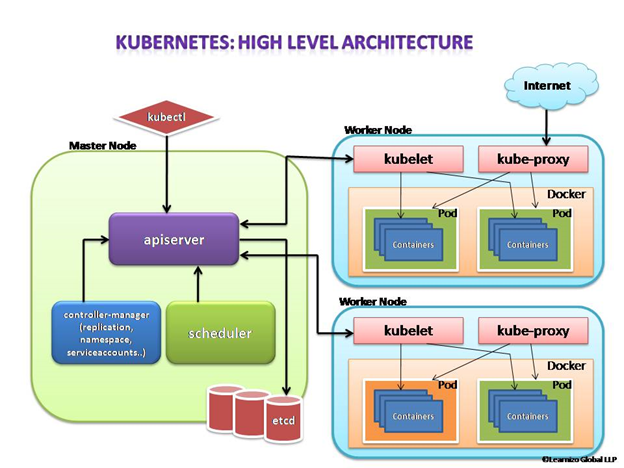
Let us have a look into each of the component’s responsibilities.
Master Node
The master node is responsible for the management of the Kubernetes cluster. This is the entry point of all administrative tasks. The master node is the one taking care of orchestrating the worker nodes, where the actual services are running.
Let’s dive into each of the components of the master node.
apiserver
The API server is the entry point for all the REST (Representational State Transfer) commands used to control the cluster. It processes the REST requests, validates them, and executes the bound business logic. The resulting state has to be persisted somewhere, and that brings us to the next component of the master node.
etcd storage
etcd is a simple, distributed, consistent key-value store. It is mainly used for shared configuration and service discovery.
It provides a REST API (Application Programming Interface) for CRUD (create, read, update and delete) operations as well as an interface to register watchers on specific nodes, which enables a reliable way to notify the rest of the cluster about configuration changes.
An example of data stored by Kubernetes in etcd is jobs being scheduled, created and deployed, pod/service details and state, namespaces and replication information, etc.
scheduler
The deployment of configured pods and services onto the nodes happens thanks to the scheduler component.
The scheduler has the information regarding resources available on the members of the cluster, as well as the ones required for the configured service to run and hence is able to decide where to deploy a specific service.
controller-manager
Optionally you can run different kinds of controllers inside the master node. controller-manager is a daemon embedding those.
A controller uses apiserver to watch the shared state of the cluster and makes corrective changes to the current state to change it to the desired one.
An example of such a controller is the Replication controller, which takes care of the number of pods in the system. The replication factor is configured by the user, and it’s the controller’s responsibility to recreate a failed pod or remove an extra-scheduled one.
Other examples of controllers are endpoints controller, namespace controller, and service accounts controller, but we will not dive into details here.
Worker node
The pods are run here, so the worker node contains all the necessary services to manage the networking between the containers, communicate with the master node, and assign resources to the containers scheduled.
Docker
Docker runs on each of the worker nodes, and runs the configured pods. It takes care of downloading the images and starting the containers.
kubelet
kubelet gets the configuration of a pod from the apiserver and ensures that the described containers are up and running. This is the worker service that’s responsible for communicating with the master node. It also communicates with etcd, to get information about services and write the details about newly created ones.
kube-proxy
kube-proxy acts as a network proxy and a load balancer for a service on a single worker node. It takes care of the network routing for TCP (Transmission Control Protocol) and UDP (User Datagram Protocol) packets.
kubectl
And finally, a command-line tool to communicate with the API service and send commands to the master node.
In our next article, we will have an insight into the Kubernetes monitoring process. Till then stay safe and happy learning with Learnizo Global.